How to Set Up a LoRaWAN Gateway in Australia
A practical guide to AU915 LoRaWAN gateways, antennas, connectivity, network servers and Australian compliance
LoRaWAN® is becoming an increasingly useful technology for connecting sensors and monitoring equipment across buildings, industrial sites, laboratories, agricultural facilities and environmental infrastructure. Its ability to transmit small amounts of data over relatively long distances while consuming very little energy makes LoRaWAN particularly attractive for Internet of Things (IoT) applications.
However, setting up a LoRaWAN network in Australia requires more than simply purchasing a "915 MHz" gateway. Australia has its own radio-frequency requirements, and equipment intended for other markets—particularly the United States—may use frequencies that are not authorised for operation in Australia.
This guide explains how to set up a LoRaWAN gateway in Australia, from selecting the hardware and antenna through to configuring the AU915 frequency plan, connecting the gateway to a network server and testing the resulting IoT network.
What is LoRaWAN?
LoRaWAN is a low-power wide-area networking technology designed to connect battery-powered devices over long distances.
A typical LoRaWAN system contains three major components:
- LoRaWAN end devices – sensors and other IoT devices that collect information.
- LoRaWAN gateways – radio gateways that receive messages from sensors and forward them over an IP network.
- LoRaWAN network and application servers – software that manages devices, processes data and provides information to applications.
A typical architecture looks like this:
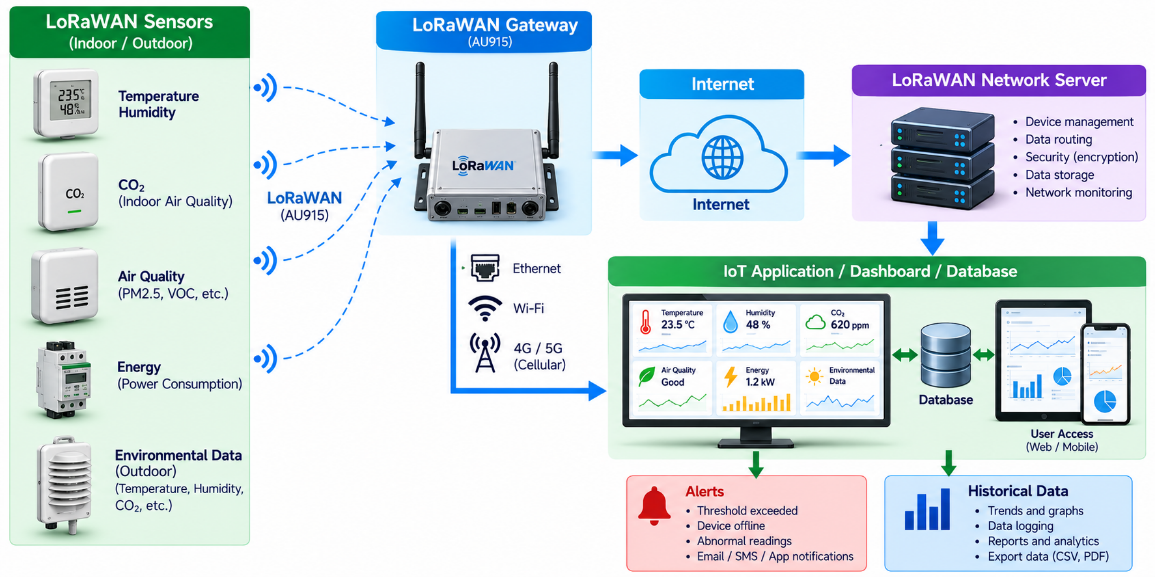
The gateway therefore acts as a bridge between the low-power LoRaWAN radio network and the IP-based Internet or private network.
1. The Most Important Consideration: Use the Australian Frequency Plan
Before purchasing a gateway, make sure it is designed for AU915-928, the LoRaWAN regional frequency plan used in Australia. The LoRaWAN regional parameters identify AU915-928 as the Australian frequency plan. This distinction is extremely important because "915 MHz" does not mean the same thing in every country. For example, the United States uses the US902-928 LoRaWAN plan, whereas Australia uses AU915-928. ACMA states that Australia's 900 MHz ISM band is 915–928 MHz and that equipment operating in the 902–915 MHz range is not authorised for operation in Australia.
Do not buy equipment based only on "915 MHz"
When purchasing a gateway or sensor, look for AU915 or AU915-928 in its specifications, not just "915 MHz".
The gateway, sensor and network-server configuration must all be compatible.
2. What Does AU915 Mean?
AU915 is the LoRaWAN regional frequency plan associated with Australia.
The plan defines how LoRaWAN devices communicate, including the available uplink and downlink channels and data rates. The full AU915 plan includes multiple channel groups. For example, The Things Network's Australian deployment uses the second sub-band, corresponding to channels 8–15, with uplink frequencies from 916.8 MHz to 918.2 MHz. This is an important practical point:
Selecting AU915 on the gateway does not necessarily mean that every AU915 channel should be used. The required channel configuration depends on the LoRaWAN network being deployed. If you are connecting a gateway to a particular public or commercial LoRaWAN network, follow that network's channel-plan requirements.
3. Choosing a LoRaWAN Gateway
A LoRaWAN gateway normally contains:
- A LoRaWAN concentrator
- A processor
- Ethernet and/or Wi-Fi
- Optional 4G/5G connectivity
- Antenna connector
- Power supply
- Gateway operating software
- Packet-forwarding software
- Optional GPS/GNSS receiver
The appropriate gateway depends on the application.
Indoor gateway
An indoor gateway can be suitable for:
- Offices
- Laboratories
- Warehouses
- Small commercial buildings
- Demonstration projects
- IoT development laboratories
Outdoor gateway
An outdoor-rated gateway is generally more appropriate for:
- Agricultural sites
- Environmental monitoring
- Water infrastructure
- Industrial sites
- Large commercial developments
- Smart-city applications
- Remote monitoring
For outdoor installations, check the enclosure's IP rating, temperature range, UV resistance and suitability for permanent outdoor operation.
4. Selecting the Antenna
The antenna is an important part of the overall LoRaWAN system.
A gateway with an excellent radio module can still perform poorly if the antenna is unsuitable or badly installed. For a general-purpose installation, an AU915-compatible omnidirectional antenna is often appropriate. The antenna should be selected together with:
- Frequency range
- Antenna gain
- Coaxial cable loss
- Connector type
- Gateway transmitter characteristics
- Installation height
- Required coverage area
Higher antenna gain is not automatically better. The complete RF system must remain within the applicable Australian operating limits. For installations requiring coverage predominantly in one direction, a directional antenna may sometimes be appropriate.
5. Where Should the Gateway Be Installed?
Gateway location can have a significant effect on network coverage. As a general rule: A gateway antenna should be installed as high and as unobstructed as practical. A gateway located on a building roof can provide substantially better coverage than the same gateway located inside a ground-floor room. Avoid locating an antenna:
- Inside a metal enclosure
- Immediately beside large metal structures
- Under substantial concrete structures
- Behind large obstructions
- Close to other high-power radio antennas
For a building-monitoring application, the ideal gateway location may be a rooftop or upper-floor plant area. For an agricultural or environmental application, a dedicated mast may be appropriate.
6. Connect the Gateway to the Internet
The gateway needs an IP connection to communicate with its LoRaWAN network server. There are three common approaches.
Ethernet
Ethernet is often the preferred solution for permanent installations where a network connection is available. Advantages include:
- Reliable connectivity
- No cellular subscription
- Simple network management
- Good bandwidth
- Low latency
Wi-Fi
Wi-Fi can be convenient for smaller installations where Ethernet is unavailable.
However, the reliability of the Wi-Fi connection should be considered if the LoRaWAN system is being used for critical monitoring.
4G/5G
Cellular connectivity is particularly useful for remote sites.
Examples include:
- Farms
- Pump stations
- Environmental monitoring stations
- Water infrastructure
- Construction sites
- Remote industrial facilities
For critical applications, a gateway with cellular failover or dual-SIM capability may be worth considering.
7. Configure the Gateway for AU915
After powering up the gateway, select AU915 / AU915-928 in its LoRaWAN regional settings.
Do not select US915 simply because the gateway is described as a "915 MHz" model.
The gateway configuration must also match the requirements of the selected LoRaWAN network server. For example, The Things Network identifies Australia as using AU915-928 and its Australian network uses the second sub-band.
8. Check Australian Regulatory Compliance
Radio equipment used in Australia is subject to requirements administered by the Australian Communications and Media Authority (ACMA). The 915–928 MHz band is used under Australia's low-interference-potential-device arrangements, subject to the relevant conditions. ACMA's current compliance guidance explains that low-interference-potential radiocommunications equipment must comply with applicable technical standards and specified requirements under the LIPD framework. ACMA documentation identifies 915–928 MHz as an Australian class-licensed band and notes that the 900 MHz ISM band in Australia is 915–928 MHz. Imported equipment deserves particular attention. Australia receives a large amount of IoT hardware from overseas. A product advertised internationally as a LoRaWAN gateway may have firmware, radio settings or certification intended for another country. Before deploying equipment, check:
- Australian frequency configuration
- Applicable ACMA requirements
- Manufacturer compliance documentation
- Transmitter characteristics
- Antenna configuration
- EMC requirements
- Labelling requirements
- Applicable EME requirements
ACMA also states that if a product is changed after testing, it may need to be retested because the change could affect compliance.
This is particularly relevant to companies developing their own IoT products or modifying imported radio equipment.
9. Register the Gateway With a LoRaWAN Network Server
The gateway needs to communicate with a LoRaWAN network server.
There are several possible approaches:
- Public/community LoRaWAN networks
- Commercial LoRaWAN network operators
- Cloud-hosted network servers
- Private LoRaWAN servers
- Self-hosted IoT platforms
The gateway is normally registered using an identifier such as a Gateway EUI or other gateway identity. Depending on the platform, you may need to enter:
- Gateway ID
- Gateway EUI
- Gateway name
- Location
- Frequency plan
- Server address
- Authentication information
Once configured correctly, the gateway should establish communication with the network server.
10. Configure the LoRaWAN Sensors
Once the gateway is operational, add the LoRaWAN sensors. A typical LoRaWAN device uses:
- Device EUI
- Join EUI
- Application Key
For new installations, OTAA — Over-The-Air Activation — is commonly used.
The basic process is:
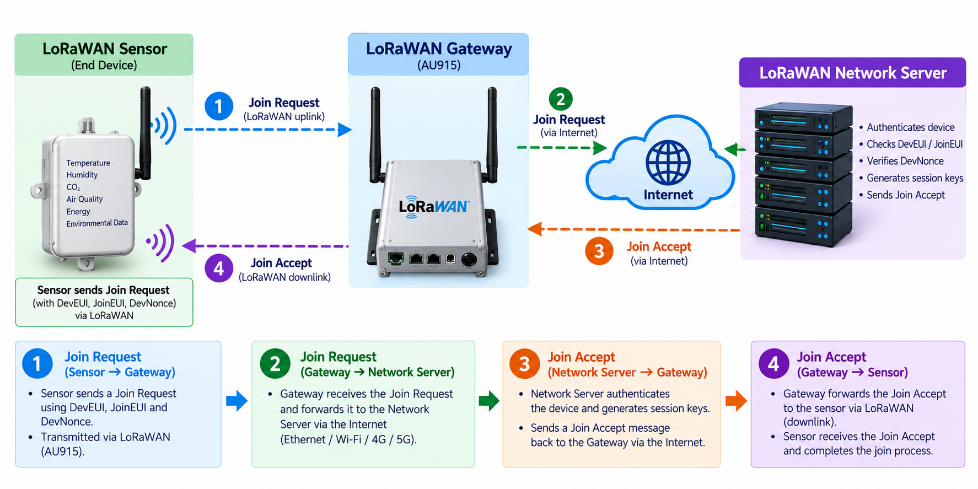
After joining, the sensor can begin transmitting application data.
The application data can contain information such as:
- Temperature
- Humidity
- CO₂
- Air quality
- Pressure
- Water level
- Energy consumption
- Equipment status
- Vibration
- Soil moisture
- Environmental parameters
11. Test One Sensor Before Deploying Many
A common mistake in IoT projects is attempting to deploy a large number of sensors before proving that the complete system works.
A better approach is:
flowchart LR
    accTitle: Test a LoRaWAN sensor end to end
    accDescr: Verify a single sensor transmits to the AU915 gateway, the network server receives the uplink, and the application displays the decoded data.
    sensor["One sensor"] --> gateway["AU915 gateway"]
    gateway --> server["Network server"]
    server --> app["Application and dashboard"]
First verify that the complete chain is functioning.
Gateway
Check:
- Internet connection
- Network-server connection
- AU915 configuration
- Gateway identifier
- Received packets
Sensor
Check:
- Successful join
- Uplink messages
- RSSI
- SNR
- Data rate
- Transmission interval
Application
Check:
- Data reception
- Payload decoding
- Correct timestamps
- Database storage
- Dashboard display
- Alarm generation
Once this has been demonstrated, additional sensors can be added.
12. Conduct a Coverage Survey
LoRaWAN is often described as a long-range technology, but actual range depends strongly on the environment. A LoRaWAN network operating across an open agricultural site can behave very differently from one operating inside a reinforced-concrete commercial building. A practical site survey should measure:
- RSSI
- SNR
- Packet delivery
- Distance
- Gateway location
- Sensor location
- Building construction
- Antenna position
- Data rate
A simple coverage test might involve moving a test sensor progressively further from the gateway and recording network performance.
This information can be used to create a coverage map.
13. LoRaWAN for Smart Buildings
LoRaWAN is particularly interesting for large commercial buildings because many monitoring points can be installed without running new communication cables.
Potential applications include:
Indoor air quality
Sensors can monitor:
- CO₂
- Temperature
- Humidity
- Particulate matter
- VOCs
- Other air-quality parameters
Energy monitoring
LoRaWAN can be used to collect information from:
- Electricity meters
- Submeters
- HVAC systems
- Pumps
- Plant equipment
Water monitoring
Sensors can monitor:
- Water consumption
- Tank levels
- Leakage
- Pump operation
- Water-system status
Building condition monitoring
Sensors can be used for:
- Equipment vibration
- Temperature
- Humidity
- Room occupancy
- Environmental conditions
A building can therefore become a distributed sensing environment without requiring extensive new cabling.
14. LoRaWAN for Environmental Monitoring
LoRaWAN is also well suited to environmental monitoring applications.
A single gateway can potentially collect data from sensors distributed across a site.
Applications include:
- Air-quality monitoring
- Weather monitoring
- Water-level monitoring
- Soil monitoring
- Environmental compliance
- Industrial emissions monitoring
- Waste-management systems
- Remote infrastructure monitoring
For developing IoT solutions, the combination of low-power sensors, long-range communication and cloud-based data processing provides an attractive platform for distributed environmental monitoring. This is particularly relevant to Australia's large geographical area and the need to monitor infrastructure outside major metropolitan areas.
15. Antenna Cable and Installation Losses
One issue that is often overlooked is RF cable loss. A gateway may have an excellent radio receiver and transmitter, but the performance can be degraded by:
- Excessively long coaxial cable
- Poor-quality coaxial cable
- Incorrect connectors
- Poor connector installation
- Water ingress
- Damaged cable
Keep the antenna cable as short as practical. For outdoor installations, use suitable weatherproof connectors and provide appropriate mechanical support. The antenna, cable and gateway should be treated as one RF system.
16. Outdoor Installation and Protection
Australian outdoor environments can be demanding.
A permanent gateway installation should consider:
- Rain
- UV exposure
- Dust
- High temperatures
- Condensation
- Insects
- Corrosion
- Lightning
- Electrical surges
- Wind loading
The gateway enclosure should be appropriate for its environment.
The antenna mounting structure should also be mechanically secure.
For installations on buildings or masts, appropriate electrical, structural and lightning-protection practices should be considered.
17. Network Security
A LoRaWAN deployment is an IoT network and should be treated as part of the organisation's broader technology infrastructure. Protect:
- Gateway passwords
- Network-server credentials
- Device keys
- Application keys
- API credentials
- MQTT credentials
- Cloud-platform credentials
Recommended practices include:
- Change default passwords
- Restrict administrative access
- Keep gateway software updated
- Disable unnecessary services
- Use secure management connections
- Segment IoT networks where appropriate
- Back up gateway configurations
- Maintain records of deployed devices
Security should be considered from the beginning of the project rather than added after installation.
18. Common LoRaWAN Problems in Australia
Problem 1: The gateway cannot connect
Check:
- Internet connection
- Ethernet/Wi-Fi configuration
- 4G/5G connection
- DNS
- Firewall
- Server address
- Gateway credentials
Problem 2: The sensor cannot join
Check:
- AU915 configuration
- Device EUI
- Join EUI
- Application Key
- Network-server configuration
- Channel configuration
- Gateway connection
A sensor configured for a different regional band plan may not communicate correctly with an Australian network.
Problem 3: The sensor joins but no data appears
Check:
- Uplink messages
- Application payload decoder
- Device configuration
- Gateway logs
- Network-server logs
- Application configuration
Problem 4: The range is lower than expected
Investigate:
- Antenna height
- Antenna orientation
- Antenna gain
- RF cable loss
- Buildings
- Metal structures
- Terrain
- Vegetation
- Gateway location
- Sensor location
Before increasing radio power, verify that the installation is already using the available RF performance efficiently and remains within applicable regulatory requirements.
19. Example Australian LoRaWAN Architecture
A practical environmental monitoring system could look like this:
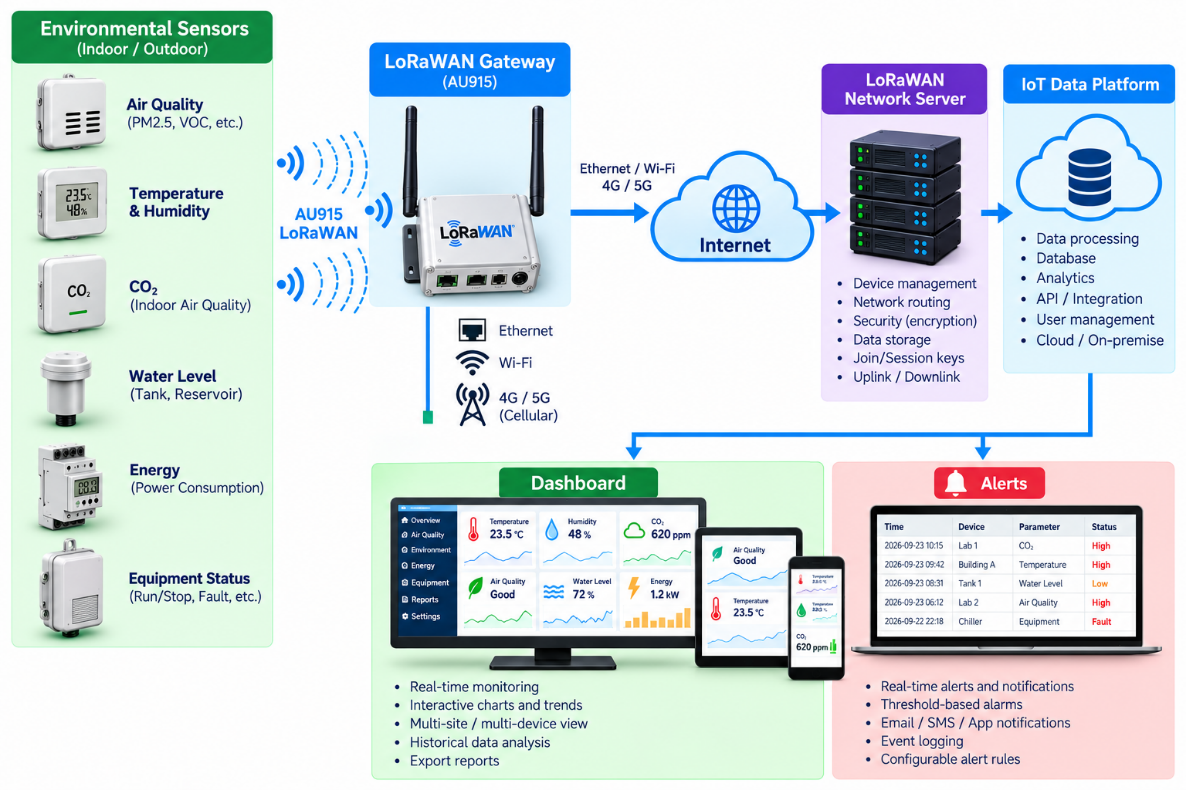
This architecture can be adapted to applications ranging from a single commercial building to distributed environmental-monitoring networks.
20. Australian LoRaWAN Gateway Checklist
Before commissioning a gateway, check the following:
| Item | Requirement |
|---|---|
| Frequency plan | AU915-928 |
| Radio hardware | Australian-compatible |
| ACMA compliance | Verified |
| Gateway | Correct regional firmware/configuration |
| Antenna | Suitable for AU915 |
| RF cable | Appropriate and weatherproof |
| Internet | Ethernet, Wi-Fi or cellular |
| Network server | Correct AU915 configuration |
| Gateway identity | Registered |
| Sensor configuration | AU915-compatible |
| Security | Credentials protected |
| Site survey | Completed |
| Coverage | Verified |
| Outdoor protection | Appropriate for environment |
| Maintenance | Configuration and software-update plan |
Conclusion
Setting up a LoRaWAN gateway in Australia is relatively straightforward when the radio configuration, network architecture and regulatory requirements are considered from the beginning. The most important steps are:
- Select an AU915-928-compatible gateway.
- Verify that the gateway and associated radio equipment meet Australian requirements.
- Install the gateway antenna in an appropriate location.
- Configure the correct Australian LoRaWAN frequency plan and required channels.
- Connect the gateway to a LoRaWAN network server.
- Register and configure the sensors.
- Conduct a real-world coverage test.
- Secure and maintain the complete IoT system.
For organisations developing environmental, energy or building-monitoring solutions, LoRaWAN can provide an effective communications layer between distributed sensors and an intelligent data platform. Cloud applications can analyse sensor data and send alerts. This helps teams identify changes in buildings, industrial sites and environmental monitoring areas. For Australian deployments, frequency selection and regulatory compliance must be part of the system design. Novel Aquatech works at the intersection of IoT, environmental technology and engineering, with an emphasis on practical technology solutions for the built environment and environmental monitoring. LoRaWAN can form an important communications component of such systems when appropriately engineered and deployed.
Australian Regulatory References
The Australian Communications and Media Authority (ACMA) should be consulted for the current regulatory requirements applicable to the specific radio equipment and installation. ACMA's current guidance explains the compliance requirements for radiocommunications equipment and identifies the applicable requirements for low-interference-potential devices. The Things Network's Australian documentation provides useful practical information on the AU915 frequency plan and its Australian network configuration. Important: Regulatory requirements can change. Equipment manufacturers, importers and system integrators should verify the applicable ACMA requirements before placing radio equipment on the Australian market or deploying it in Australia.